
122 lines
5.2 KiB
Markdown
122 lines
5.2 KiB
Markdown
# Shaarli Material Theme
|
|
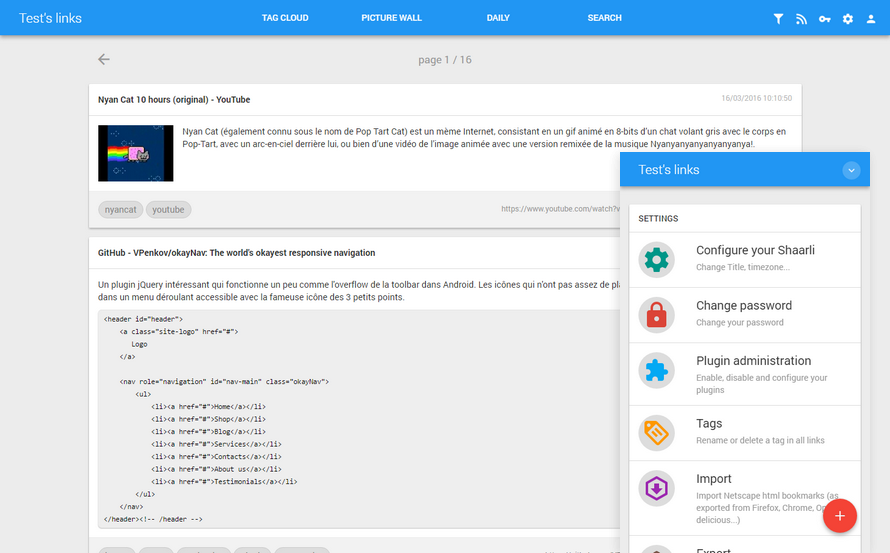
Shaarli Material is a theme for [Shaarli](https://github.com/shaarli/Shaarli), the famous personal, minimalist, super-fast, database free, bookmarking service.
|
|
|
|
|
|
## Screenshots
|
|
|
|
|
|
[More screenshots](https://github.com/kalvn/Shaarli-Material/tree/master/screenshots).
|
|
|
|
|
|
## Compatibility
|
|
Shaarli Material follows the exact same versions numbers than Shaarli. It means that if you install Shaarli vX.Y.Z, you must use Shaarli Material vX.Y.Z.
|
|
|
|
Shaarli Material was tested and validated with **Shaarli 0.14.0**.
|
|
|
|
|
|
## Download
|
|
To download this theme, [visit this page](https://github.com/kalvn/Shaarli-Material/releases) and choose the most recent version matching the version of your Shaarli installation. Both use the same notation.
|
|
|
|
Versions suffixed by `-patch.x` include some bugfix so take those preferentially if they exist for the version that fits your Shaarli installation.
|
|
|
|
If you install an older version, please read the README.md file you'll find in the root folder rather than this one.
|
|
|
|
|
|
## Installation
|
|
Download the `material` folder into the `tpl` directory of your Shaarli installation next to the `default` directory.
|
|
|
|
Access your Shaarli and finish the setup process. Then, go into menu **Tools > Configure your Shaarli** and change the setting **Theme** to **Material**.
|
|
|
|
You can now enjoy your new Material theme.
|
|
|
|
|
|
## Customization
|
|
### Configuration
|
|
You can customize a few things using the `data/config.json.php` file of your Shaarli installation. If the file doesn't exist, just create it. Be careful to respect the JSON format notation (end lines with a comma except for the last item, just before the closing curly brace), otherwise you'll get errors.
|
|
|
|
Here are parameters you can set.
|
|
|
|
- `config.MATERIAL_PHP_DATE_PATTERN` (optional): Customizes the date format. Check this to know what to write: https://php.net/manual/function.strftime.php (ex: `"%d/%m/%Y"` will output for example '30/05/2015').
|
|
- `config.MATERIAL_NO_QRCODE` (optional): Removes the QR code control of the theme. To completely get rid of QR Codes, you of course need to disable the qrcode plugin as well.
|
|
- `config.MATERIAL_COLOR` (optional): Customizes the theme's colors. It's used for example on Android for notification bar. It will generate `<meta name="theme-color" content="YOURCOLORHERE">`.
|
|
|
|
|
|
Here is an example of what you can configure (in real life, there will be other parameters in the file, just add those to the different categories):
|
|
|
|
```json
|
|
{
|
|
"resource": {
|
|
"raintpl_tpl": "tpl\/material\/"
|
|
},
|
|
|
|
"config": {
|
|
"MATERIAL_PHP_DATE_PATTERN": "%d\/%m\/%Y %H:%M:%S",
|
|
"MATERIAL_NO_QRCODE": true,
|
|
"MATERIAL_COLOR": "#607D8B"
|
|
}
|
|
}
|
|
```
|
|
|
|
### Custom Open Graph image
|
|
[Open Graph](https://ogp.me/#metadata) is a protocol that enables web site developers to attach rich metadata that will be used when sharing a link on social medias for example.
|
|
|
|
Shaarli Material supports adding a custom image that will be used by default when no image is attached to a shared link.
|
|
|
|
To add yours, create a PNG image and save it as `tpl/material/opengraph.png`.
|
|
|
|
### Custom CSS
|
|
You can add your own CSS rules in file `data/user.css`. You'll find an example that shows how to change the whole theme color in `user.example.css`.
|
|
|
|
|
|
## Add custom resources
|
|
If you want to add your custom scripts or styles (for example analytics script), you must create a new template named `extra.html` in the *material* folder.
|
|
Then, anything you add in this file will be included at the end of the `<head>` tag.
|
|
|
|
This file is NOT commited on the repository, which allows you to update the theme without overriding this file.
|
|
|
|
|
|
## Plugins
|
|
As from Shaarli v0.6.0, you can install plugins to enrich your experience.
|
|
Most of them should work properly, although it's up to the plugin developer to ensure the code is as minimal as possible to integrates well in custom themes.
|
|
I tested all plugins available with Shaarli 0.6.0 and they all work well even though the display is a bit weird for some of them. I will keep monitoring the behavior of popular plugins in the future.
|
|
|
|
|
|
## Libraries used
|
|
This theme uses a few JavaScript libraries.
|
|
|
|
- [jQuery](http://jquery.com/)
|
|
- [Bootstrap](http://getbootstrap.com/)
|
|
- [awesomplete](http://leaverou.github.io/awesomplete/)
|
|
- [blazy](http://dinbror.dk/blazy/)
|
|
- [Sortable](http://rubaxa.github.io/Sortable/)
|
|
- [Salvattore](https://salvattore.js.org/)
|
|
- [Autosize](https://github.com/jackmoore/autosize/)
|
|
- [node-qrcode](https://github.com/soldair/node-qrcode)
|
|
|
|
|
|
## Demo
|
|
A read-only demo is available on my personal Shaarli : [https://links.kalvn.net](https://links.kalvn.net)
|
|
|
|
|
|
## Develop and debug
|
|
To tweak this theme, you'll need to install dependencies and to build JavaScript and CSS libraries. To do this, install [Node.js and NPM](https://nodejs.org) and run this from the root folder:
|
|
|
|
```bash
|
|
$ npm install
|
|
$ npm run dev
|
|
```
|
|
|
|
|
|
## Build for production
|
|
|
|
```bash
|
|
$ npm install
|
|
$ npm run build
|
|
```
|
|
|
|
------------------------------------------------------------------------------
|
|
|
|
You can download Shaarli via the Github project page: https://github.com/shaarli/Shaarli
|
|
|
|
Original project page: http://sebsauvage.net/wiki/doku.php?id=php:shaarli
|